3DHaupt

3D-artist for modeling, texturing, rigging and animation since 2008.

  • Blog
    • Sphere-Bots Run-Cycle Test on Rough Terrain
    • Alien Animal Update in Blender-2.8x
    • Intergalactic Spaceship In Blender 2.8 Eevee
    • A USB-Stick High and Low-Poly (Office Stuff)
    • Mech Neck Walker – Blender Game Engine
    • Star Fighter Spacecraft
    • Box Cutter 3D Model in different Versions
    • Animated Notepads (Office Stuff Collection)
    • Scissors High and Low-Poly (Office Stuff)
    • Coffee Cup (Office Stuff Collection)
    • The AI Control Module (Construction Kit)
  • 3D-Models / Downloads
    • Buildings
      • Tower House Design
      • Wooden Watch Tower
      • Modular Sewerage Construction Set
      • Residential Building Set
        • Residential Building Set WIP (17.03.2012 – 18.03.2012)
      • Medieval Guard Tower
        • Medieval Guard Tower WIP (26.02.2011)
      • Futuristic ghetto building
        • Futuristic Ghetto Building Work in Progress (20.11.2012)
      • BGE Building
        • BGE Building Work in Progress (17.11.2013 – 10.12.2013)
    • Vehicles
      • Futuristic Car Game-Ready
        • Futuristic Car Work in Progress (31.03.2012 – 13.04.2012)
      • Five Wheeler (Blender 2.8 Version)
      • Amphibious Tank
      • Mech Neck Walker – Blender Game Engine
      • Modular UFO
      • Intergalactic Spaceship In Blender 2.8 Eevee
      • Star Fighter Spacecraft with Shield and Laser Animation
      • E-45 Aircraft
        • E-45 Aircraft Work in Progress (17.08.2012 – 20.08.2012)
      • Futuristic Transport Shuttle Rigged and Game-Ready
        • Futuristic Transport Shuttle Work in Progress (31.10.2011 – 12.11.2011)
      • Futuristic Freigther
      • Futuristic Car 3d-Print
      • Futuristic Combat Jet Rigged
        • Futuristic Combat Jet Rigged Work in Progress (03.02.2012 – 11.02.2012)
      • Big Hovercraft
        • Big Hovercraft Work in Progress (03.06.2015)
      • Futuristic-climbing-vehicle
      • Controllable Drone Design
    • Tools
      • Multi-Tool
        • Multi Tool Work in Progress (29.01.2014)
      • Box Cutter High-Poly Version
        • Box Cutter High-Poly Version Work in Progress (20.11.2016)
      • Chainsaw Animated Low-Poly
        • Chainsaw Animated Work in Progress (26.01.2014)
      • Chainsaw High-Poly Version
        • Chainsaw Work in Progress (20.01.2014)
      • Survival AR Headset
      • Fire Extinguisher
    • Creatures and Animals
      • Alien Animal Update in Blender-2.8x
      • Black Dragon Rigged and Game Ready
        • Black Dragon Work in Progress (09.11.2009 – 31.01.2010)
      • Wolf Rigged and Game Ready
        • Wolf Work in Progress (14.03.2011 – 05.04.2011)
      • Low-Poly Spider Rigged and Game Ready
        • Low-Poly Spider Work in Progress (15.05.2010 – 08.06.2010)
    • 3D Effects and Animations
      • Placeholder Cube Version 1
      • 3d-Video-Effects
        • Video Countdown 5 4 3 2 1
      • Bullet Physics Animations
        • Bullet Physics Demolition Animation 1
        • Bullet Physics Demolition Animation 2
        • Bullet Physics Demolition Animation 3
        • Bullet Physics Demolition Animation 4
        • Bullet Physics Demolition Animation 5
        • Bullet Physics Demolition Animation 6 Earthquake
        • Bullet Physics Demolition Animation 7 Reconstruction
        • Bullet Physics Animation 8 Reconstruction
        • Bullet Physics Animation 9 Reconstruction
    • Weapons
      • 45 ACP Smith and Wesson Hand Gun
        • Smith and Wesson Gun Model Work in Progress (21.06.2011 – 26.06.2011)
      • Futuristic Weapon Concept High-Poly Version
        • Futuristic Weapon Concept High-Poly Work in Progress (14.03.2014)
      • Futuristic Weapon Concept Low-Poly
        • Futuristic Weapon Concept Low-Poly Work in Progress (21.09.2014)
      • Sniper Rifle KSR-29
      • Submachine Gun M24 R
      • Rusty Stun Spear
    • Robots
      • Gun Bot
      • Sphere-Bots Run-Cycle Test on Rough Terrain
      • Mech Neck Walker – Blender Game Engine
      • Roboter Arm
    • Construction Elements
      • Sci-Fi Stairs Set
      • Animated Window Component
        • Animated Window Component Work in Progress (13.01.2013)
      • Animated Room Door
        • Animated Room Door Work in Progress (11.01.2013)
      • Metal Water Tank
      • Aluminum Spiral Staircase
      • Old Basement Door
      • Roller Shutter
      • Sci-Fi Door Animated
      • Massive Door Animated
      • Industrial Fan
    • Furniture
      • Chairs
        • Chair Set Low-Poly
        • Basket Stool (Mid-Poly Version)
        • Basket Stool (High-Poly Version)
        • Bar Stool
      • Tables
        • Wooden table with glass plate
          • Wooden Table with Glass Plate Work in Progress (14.01.2013)
      • Cabinets
        • Cabinet Small
        • Cabinet Lage
        • Small Fridge
      • Interior
        • Coffee Pot
        • Destructible Box
        • Improvised Gas Cooker
    • Electronics
      • Computers and video devices
        • Notebook Low-Poly
        • Cryptex USB-Stick (Rigged)
        • Alienware 18
          • Alienware 18 Gaming Laptop Work in Progress (17.05.2015)
        • HP Laptop High-Poly Version
        • Gamepad Keyboard Hybrid
          • Gamepad Keyboard Hybrid Work in Progress (29.04.2015)
        • External Hard Drive
        • Satellite Dish
          • Rigged Satellite Dishes Work in Progress (14.11.2012 – 22.11.2012)
      • Audio Devices
        • JGC Radio Rigged and Animated
          • JGC Radio Work in Progress (21.01.2013)
        • Headphone from Sennheiser Urbanite
      • Kitchenware Electronics
        • Coffeemachine
          • Coffee Machine Work in Progress (16.02.2013)
        • Microwave
          • Microwave Work in Progress (12.02.2013)
        • Water Boiler
          • Water Boiler Work in Progress (13.02.2013)
      • Lamp and Light Models
        • Energy Saving Lamp
        • Rigged Wall Lamp
          • Rigged Wall Lamp Work in Progress (30.01.2013)
      • Fan-Ventilator
      • Wireless Office Phone
      • Mobile Air Conditioner
    • Anatomy
      • Rigged Hands
      • Eyeballs
    • Plants
      • Indoor Plants
        • Indoor Pot Plant 2
        • Indoor Pot Plant 3
        • Rigged Indoor Plant
    • 3D-Printables
      • Geocaching Capsule
      • Spaceship 3D-Printable
    • Game Prototypes
      • BGE Building
        • BGE Building Work in Progress (17.11.2013 – 10.12.2013)
      • Controllable Drone – Blender Game Engine
      • Sphere of Steel – Game Prototype
    • Downloads old
  • Tutorials
    • PBR texture bake workflow in Blender-2.8
    • How to make an animated ocean scene in Blender
    • How to Export a fbx-file in Blender with reduced keyframes
    • Blender Game Engine
      • How to create real-time glass
    • Rigging and Animating in Blender
      • Tutorial: Rigging and Animating a Combat Jet in Blender
    • Sculpting
      • Create, save and load a self-made Brush
  • Random Image Collection
  • ABOUT Me
  • Contact
  • Impressum
    • About Me
    • Contact Me
    • Datenschutzerklärung (DSGVO)

How to make an animated ocean scene in Blender

Posted by 3DHaupt on 29. February 2016
Posted in: Animation, Blender, High-Poly, How to make an animated ocean scene, Sketchfab, Tutorials. Tagged: Animated, Animation, Blender, Blender-3d, boat, How to, Ocean, shape-keys, tutorial. Leave a comment

Here is a tutorial on how I made my animated ocean scene on Sketchfab
by using animated modifiers and shape keys in Blender.

Here is the scene I am talking about.

First add a mesh object. I used a plane but you can use any mesh object, like a cube, sphere or the monkey.

Select the object and click on ‘Add Modifier’ and choose the Ocean modifier.
2

Animating the Ocean Modifier

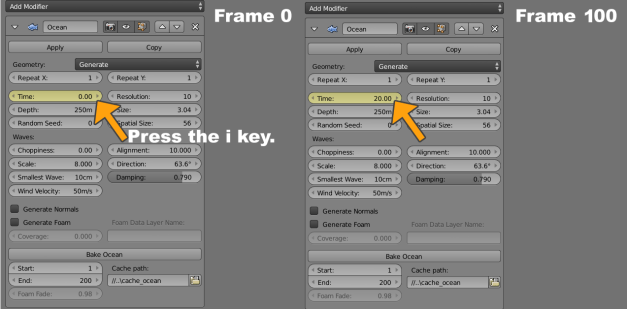
To animate the Ocean modifier, set the current scene frame to 0.

To do this, hover over ‘Time’ in the ‘Modifier’ panel and press the ‘i’ key so time 0.00 is the key frame for frame 0.

Then go to scene frame 100 and set ‘Time’ to 20.00 and key it by pressing the ‘i’ key again.
3

Now you have an animated ocean which starts slowly and ends slowly during the animation.

This doesn’t look natural because the animation is interpolated as ‘Bezier Curve, so let’s fix that by making the animation uniform / linear.

There are two ways to do this; by using the Graph Editor or the Droop Sheet Editor.

I used the Graph Editor to see the animation curve for the modifier from frame 0 to 100 in one graph.

Into to graph editor window: select the start and the end point of the graph by pressing the ‘a’ key, so you select everything that is contained in this window.

Under ‘Key/Interpolation Mode’ you can define the handles of the graph.

Select ‘Linear’ to get an equal increase and a uniform ocean animation.

4

Converting the Ocean Modifier into shape keys for use on Sketchfab

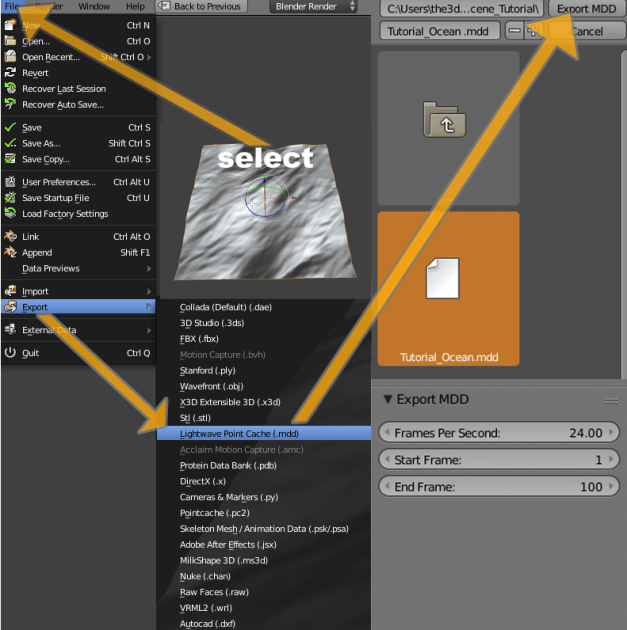
First, select the object with the ocean modifier and export it as Lightwave Point Cache (.mdd). File/Export/Lightwave Point Cache (.mdd)/Export MDD).

In the Export MDD settings as well as the render settings, you can define the frames per second and start / end frame of your animation.
5

Now a copy of the object with the ocean modifier is needed.

Copy it with Shift + D and put it on another layer with the M key.

Choose an empty layer. Go to the layer where your copy is.

To transfer the Lightwave Point Cache (.mdd) to the copy the ocean modifier must be applied.

But before that, set the waves scale to 0.000 to get an even surface.

Why was this done?

The Lightwave Point Cache (.mdd) file needs the same vertices, so the ocean modifier had to be applied (because the animated vertices are saved into the .mdd export per frame).

Remember, the object with the Ocean Modifier is just a plan; so this must be done.

The even surface makes it easier for objects to interact with, like a boat (by using Vertex Groups).

More about this later.

6

Now import the Lightwave Point Cache (.mdd) file to the new object.

Select the surface, press ‘space’ and enter ‘Import MDD’. Select your MDD file and click ‘Import MDD’.

You are now done and have your shape keys in Blender.

7

You can now upload it to Sketchfab and you will get something like this:

Download

Now I will show you how I have break the waves with an object in combination with a Shrinkwrap Modifier for the ocean object.
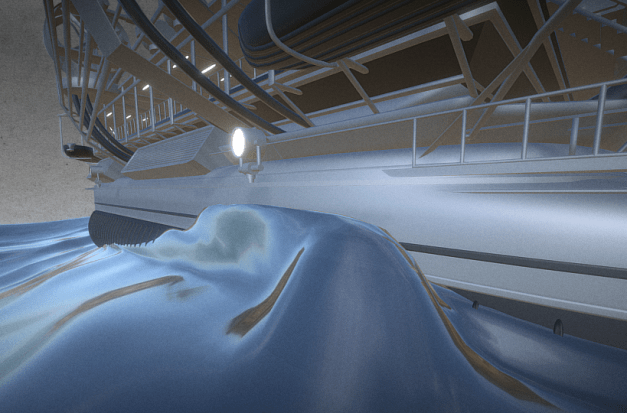
breaking the waves

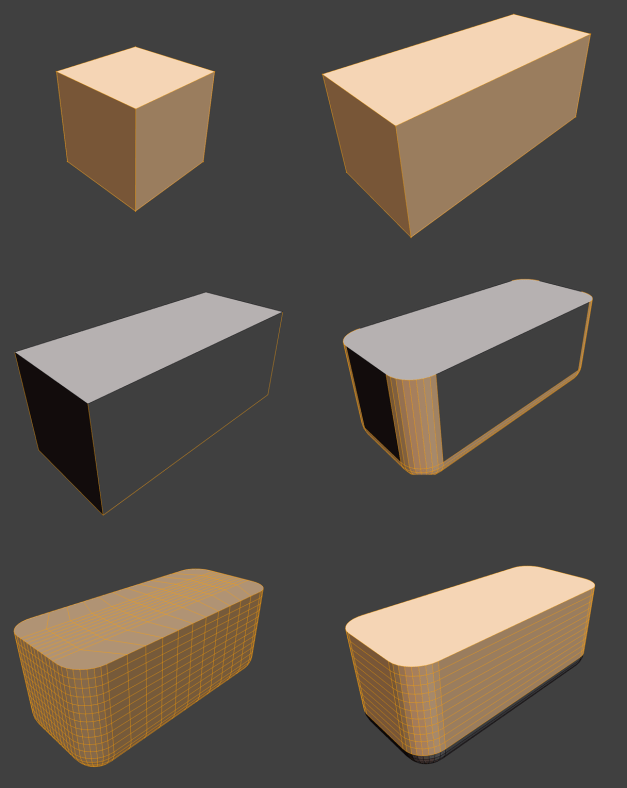
Find or create an object you want to use like a boat, flotsam, etc.
8

This object will be used for the Shrinkwrap Modifier; we will setup for the ocean object later.

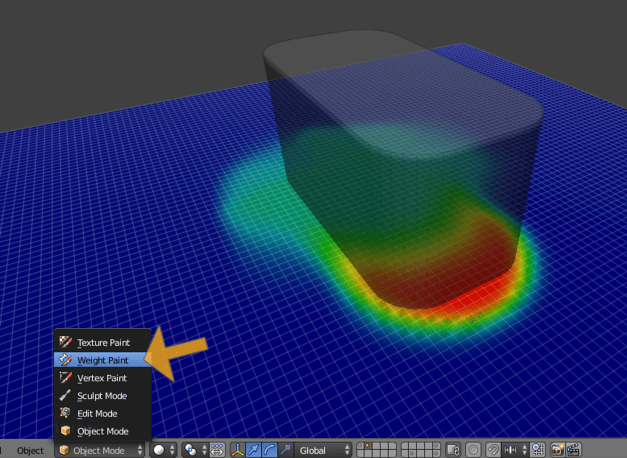
Create a vertex group for the ocean object to mark the vertices which will be influenced by the Shrinkwrap modifier.

Select the ocean object and go into the Weight Paint Mode to paint on it.
9

Painting on the ocean surface will cause a new vertex group to be created automatically.

The vertex group is named ‘Group’; name it as you wish. Since I am lazy, it is still called ‘Group’ ;)

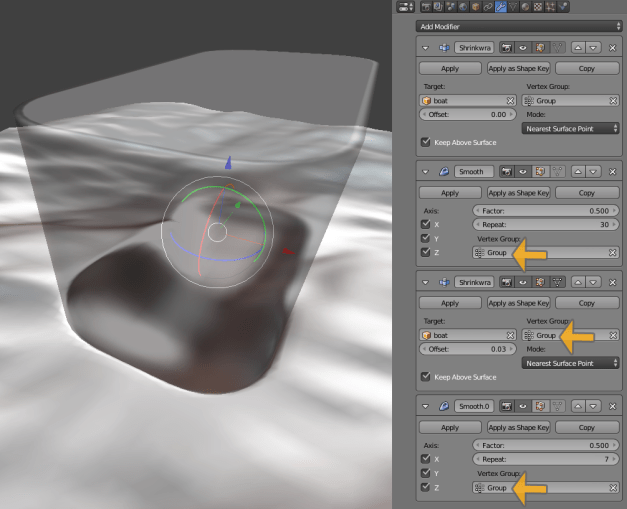
Enter your group into the vertex group section of the Shrinkwrap Modifier.

Also the object for the Shrinkwrap must be satisfied. In my case it is called boat.

After this you can play your animation to see how it looks and to fix your vertex group if you are not satisfied with it.

10

(For a better result I have used two Smooth Modifiers and another Shrinkwrap Modifier in an arrangement like you can see in the picture below. For the Smooth Modifiers I have taken the same vertex group like I used for the Shrinkwrap Modifier.)
12

Almost Done

If satisfied with your scene, export the selected ocean object as Lightwave Point Cache (.mdd) and reimport it like explained before.

Do not forget to delete the Modifiers and the old Shape Keys before importing the new Lightwave Point Cache (.mdd) to the ocean object.

13

Tutorial result:

Download

Thank you very much for reading.
I hope it was interesting and informative :)

Like Loading...

Posts navigation

← Older Entries
Newer Entries →
  • Some Links

    • Sketchfab
      • My latest 3d-Models on Sketchfab
        • Animation Collection
        • Vehicles Collection
        • Robot Collection
        • Futuristic Weapons Collection
        • Buildings Collection
        • Office-Stuff Collection
        • 3d-Printable Models
        • Creatures and Animals Collection
    • Sketchfab (VIS-All-3D)
    • CGTrader
      • My free 3d models on CGTrader
    • CGTrader (VIS-All-3D)
    • CGTrader (Image Gallery)
    • Artstation
    • Tf3dm
    • p3d.in
    • YouTube
    • Sharecg
    • TurboSquid
    • Poly.google
    • Cubebrush
    • Blend Swap
  • Enter your email address to follow this blog and receive e-mail notifications of new posts.

  • Latest Posts

    • 3DHaupt's avatar 3DHaupt
      • Sphere-Bots Run-Cycle Test on Rough Terrain
      • Alien Animal Update in Blender-2.8x
      • Placeholder Cube Version 1
      • Cryptex USB-Stick (Rigged)
      • Modular UFO
      • Five Wheeler (Blender 2.8 Version)
      • Amphibious Tank (New Rig)
      • Mech Neck Walker – Blender Game Engine
      • Star Fighter Spacecraft with Shield and Laser Animation
      • Sci-Fi Stairs Set
  • Datenschutzerklärung (DSGVO)
Website Built with WordPress.com.
Privacy & Cookies: This site uses cookies. By continuing to use this website, you agree to their use.
To find out more, including how to control cookies, see here: Cookie Policy
  • Subscribe Subscribed
    • 3DHaupt
    • Join 55 other subscribers
    • Already have a WordPress.com account? Log in now.
    • 3DHaupt
    • Subscribe Subscribed
    • Sign up
    • Log in
    • Report this content
    • View site in Reader
    • Manage subscriptions
    • Collapse this bar
 

Loading Comments...
 

    %d